

CAT 2026 Admit Card: Your Essential Guide to Download, Details & Exam Day Readiness
Admission & Info Tools
Need Expert Assistance?
Our counselors can help you with fee structures, eligibility guidelines, and upcoming admission cutoffs instantly.
Direct Application Tools
Share this Article
🎯 MatchToCollege AI Recommendation: Planning your counselling or choice filling? Check your seat allotment probability across premier colleges using the CAT College Predictor.
CAT 2026 Admit Card: Key Dates & Overview
The CAT 2026 Admit Card is a mandatory document for appearing in the Common Admission Test. It contains vital information about your candidature, exam centre, and schedule. It's crucial to download it promptly and verify all details. Here’s a quick summary of the key dates and information:
| Parameter | Details |
| Admit Card Release Date | November 6, 2026 (12 PM) |
| Download Window | November 6 to November 29, 2026 |
| Official Website | iimcat.ac.in |
| CAT 2026 Exam Date | November 29, 2026 (Sunday), in 3 sessions |
| Conducting Institute | IIM Indore |
You can access the official download portal directly via this link once the admit card is released.
Downloading Your CAT Admit Card: A Step-by-Step Guide
Downloading your CAT 2026 Admit Card is a straightforward process, but it requires attention to detail. Follow these steps carefully to ensure a smooth download from the official IIMCAT portal:
- Visit the Official IIMCAT Website: Open your web browser and go to iimcat.ac.in.
- Locate the Admit Card Link: On the homepage, look for the 'CAT 2026 Admit Card Download' or 'Registered Candidate Login' link.
- Log In: Click on the link and you will be redirected to the login page. Enter your registered User ID (usually your email address) and Password.
- Access Your Dashboard: After successful login, you will land on your candidate dashboard.
- Download Admit Card: Find the 'Admit Card' tab or link on your dashboard. Click on it to view your CAT 2026 Admit Card.
- Print Your Admit Card: Once displayed, download the PDF file and take at least two clear printouts on A4 size paper. Remember, a digital copy on your phone or tablet is not accepted at the test centre.
Important Advice: Keep at least two printed copies – one to carry into the exam hall and one as a backup. Do not fold or laminate the printout, as this can sometimes obscure crucial details or security features.
Essential Details on Your Admit Card & Verification
Immediately after downloading, meticulously check every detail on your CAT 2026 Admit Card. Any discrepancy, no matter how minor, must be addressed promptly. Your admit card will contain the following critical information:
- Candidate's Name
- CAT Registration Number
- Candidate's Photograph and Signature
- Date of Birth
- Category (General, SC, ST, OBC, PwD, etc.)
- Exam Date and Day
- Test Session and Time
- Test Centre Name and Address
- Google Map Link to Test Centre
- Reporting Time at Centre
- Gate Closing Time
- Important Instructions for Exam Day
If you spot any discrepancy, such as a misspelling in your name, incorrect photograph, or wrong category, contact the CAT 2026 helpdesk via the email address or phone number listed on iimcat.ac.in immediately. Provide your registration ID and supporting documents (like your Class 10 certificate) to request a correction before the window closes. Timely action is crucial to avoid issues on exam day.
Troubleshooting Common Admit Card Issues
It's not uncommon for students to encounter minor hurdles during the admit card download process. Don't panic if you face an issue; most problems have simple solutions. Here are the most common issues and how to resolve them:
1. Login Issues (Incorrect Credentials)
- Check Caps Lock: Ensure your Caps Lock key is off, as passwords are case-sensitive.
- Verify User ID: Your User ID is typically your registered email address. Double-check for typos.
- Clear Browser Cache: Sometimes, old browser data can interfere. Clear your browser's cache and cookies, then try again.
- Try a Different Browser: If one browser isn't working, try another (e.g., Chrome, Firefox, Edge).
2. Forgot IIMCAT Login Credentials? Here's What to Do
If you cannot log in because you've forgotten your password or lost access to your registered email, follow these steps:
- Use 'Forgot Password' Option: On the IIMCAT login page, click on the 'Forgot Password' link.
- Enter User ID: You will be prompted to enter your User ID (registered email address).
- Receive Reset Link: A password reset link will be sent to your registered email address. Follow the instructions in the email to set a new password.
If you have also lost access to your registered email account, contact the CAT 2026 helpdesk immediately. Their details are listed on iimcat.ac.in. Provide your full name, date of birth, and registration details to verify your identity and regain access. Be prepared to provide supporting documents.
3. Admit Card Not Displaying/Downloading
- Check Internet Connection: Ensure you have a stable internet connection.
- Pop-up Blockers: Disable any pop-up blockers in your browser, as the admit card might open in a new window.
- Server Load: On the first day of release, servers can be overloaded. Try again after some time, perhaps during off-peak hours.
Crucial Exam Day Instructions & What to Carry
Your CAT 2026 Admit Card is more than just an entry pass; it's a document that dictates your exam day conduct. Adhering to the instructions is non-negotiable. Here's what you absolutely need to know and carry:
- Printed Admit Card: You MUST carry a physical printout of your CAT 2026 Admit Card on A4 paper. A digital copy on a phone or tablet is strictly not allowed.
- Valid Photo ID: Carry one original, valid photo identification proof. Accepted IDs include Aadhaar Card, Passport, Driving License, PAN Card, Voter ID, or College ID. The name on your ID must match the name on your admit card.
- PwD Certificate (if applicable): Candidates with disabilities must carry their original PwD certificate.
- Prohibited Items: Do NOT carry any electronic gadgets (mobile phones, smartwatches, calculators), stationery items (pens, pencils, paper – these will be provided), or eatables into the exam hall.
- Reporting Time: Arrive at the test centre well before the reporting time mentioned on your admit card to complete the necessary security checks and registration formalities.
- Biometric Verification: Be prepared for biometric verification at the test centre.
- Follow Invigilator Instructions: Listen carefully to all instructions given by the invigilators.
Remember, meticulous preparation extends beyond academics to logistical readiness. Ensure you are well-rested, reach the centre on time, and carry only the permitted items. Your focus should be entirely on the examination.
🏛️ Looking for Admissions & College Cutoffs? Explore verified fee structures, seat matrices, and real student reviews across top institutions on the MatchToCollege Top Colleges & Universities in India Directory.
Frequently Asked Questions
Q: When was the CAT 2026 admit card released?
The CAT 2026 admit card was released on November 6, 2026, at 12 PM. Candidates can download it from the official IIMCAT website until the exam date.
Q: Where can I download the CAT 2026 admit card?
You can download the CAT 2026 admit card from the official IIMCAT portal at iimcat.ac.in. You will need to log in with your registered User ID (email address) and the password you set during registration.
Q: What documents must I carry on CAT 2026 exam day?
You must carry a printed copy of your CAT 2026 admit card and one valid original photo ID such as an Aadhaar card, passport, driving licence, or PAN card. Candidates with disabilities must also carry their original PwD certificate if applicable. No other personal items or electronic gadgets are allowed.
Q: What should I do if there is an error on my CAT 2026 admit card?
If you spot any discrepancy on your CAT 2026 admit card, contact the CAT 2026 helpdesk immediately. Their contact details (email and phone number) are available on iimcat.ac.in. Be ready to provide your registration ID and supporting documents (e.g., Class 10 certificate) to facilitate the correction process before the deadline.
Q: Can I show the CAT 2026 admit card on my phone at the test centre?
No, you cannot. It is mandatory to carry a physical printout of the admit card on A4 paper. A digital copy on a phone or tablet will not be accepted at the test centre gate, and you may be denied entry.
Q: What happens after the CAT 2026 exam?
After the CAT 2026 exam, IIMs will release the official answer key and then the results. Based on your percentile, you will be shortlisted for the Written Ability Test (WAT) and Personal Interview (PI) rounds by various B-schools. To get an early estimate of your admission chances into IIMs, FMS Delhi, SPJIMR, and other top B-schools based on your expected CAT percentile, you can use our CAT College Predictor tool.
Related Topics
Featured Mentioned Colleges
Explore institutions featured and discussed in this article
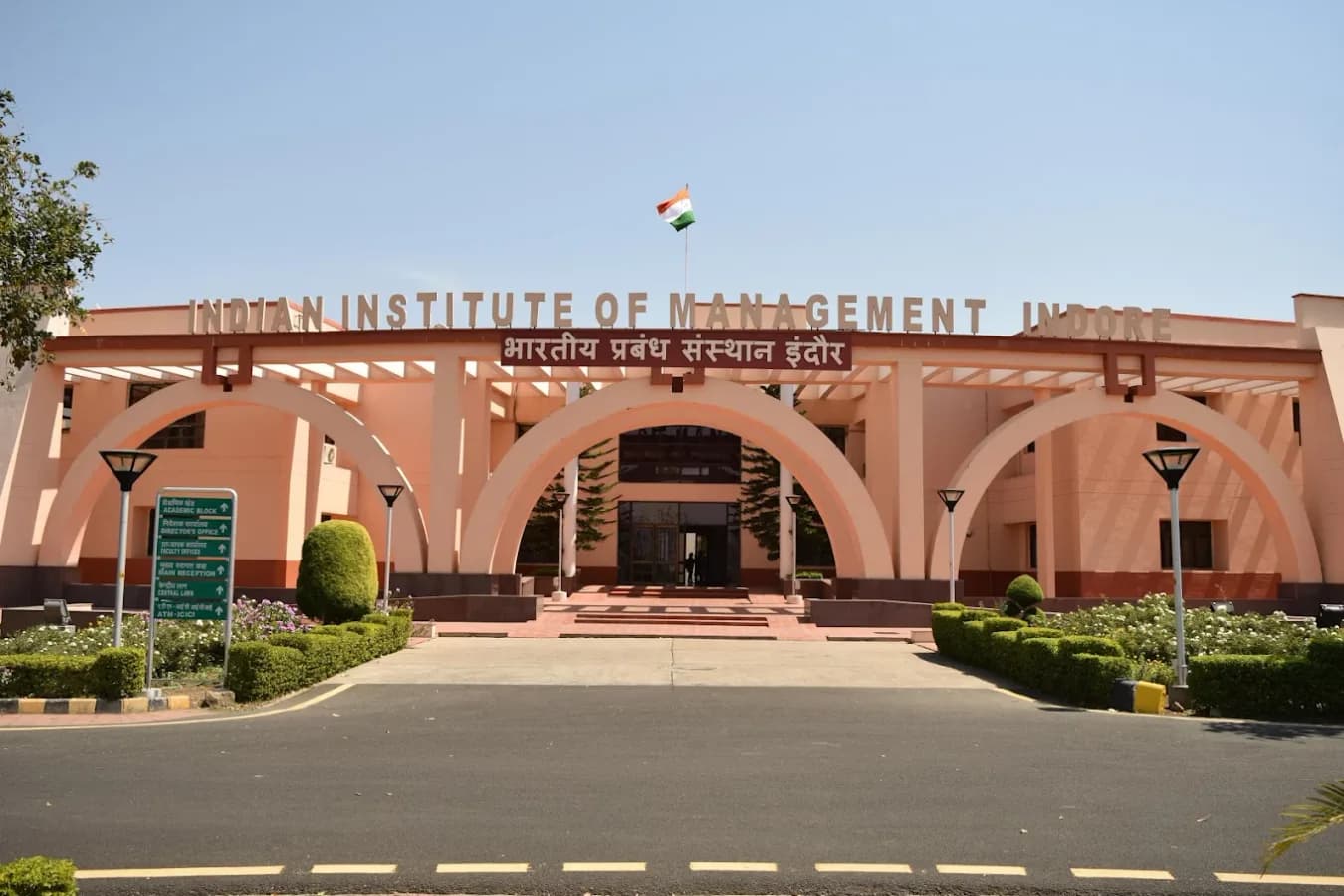

An Institution of Excellence With the objectives of imparting high-quality management education and training, the Department of Higher Education, Ministry of Education, Government of India, established the Indian Institute of Management Indore as an institution of excellence. These institutions are recognized as premier management institutions, comparable to the best in the world for teaching, research, and interaction with industries. Established in 1996, the Indian Institute of Management Indore (IIM Indore) has been a leader in the field of management education, interfacing with the industry, government, and PSUs. It is promoted and nurtured by the Ministry of Education, Government of India, and is an institute of national importance under the Indian Institutes of Management Act 2017. Situated atop a scenic hillock, the 193-acre campus of IIM Indore provides an ideal backdrop for contemplative learning. IIM Indore has the latest in teaching aids, rich learning resources, a strong IT backbone, state-of-the-art sports complex and hostels, and contemporary infrastructure.
Total Fees
Contact for Fees
Total Courses
17
Get More Info About CAT 2026 Admit Card
Recommended Articles

Mastering JEE Main Maths 2027: Your Ultimate Revision & Strategy Guide
Struggling with JEE Main Mathematics? This comprehensive guide offers a mentor-led roadmap for 2027 aspirants, focusing on high-yield topics, strategic revision, and proven techniques to boost your scores and secure a top percentile.

JEE Main 2027: Your Definitive Guide to Registration, Dates & Success
Navigate JEE Main 2027 with our comprehensive guide. Understand registration, key dates, eligibility, and preparation strategies to secure your dream engineering seat.

Important: Content Mismatch - CLAT Logical Reasoning for MBA Guide
This guide addresses a critical content mismatch: the provided raw article details CLAT Logical Reasoning, not MBA. While structured as an MBA guide, all factual data within pertains to CLAT, not MBA entrance exams.